




SpliceCraft is a plasmid workbench that runs where you already work. Open a map, edit the sequence, design primers, plan a Golden Braid or MoClo assembly, BLAST a hit, check your Sanger reads, and keep a lab notebook — all from the keyboard, in one place, no browser tab and no cloud account. Circular and linear maps render as crisp Unicode braille graphics in any modern terminal, and nothing leaves your machine unless you ask it to.
It's built by a practicing bioengineer for daily bench work: the bug reports come from real cloning, and so do the fixes.
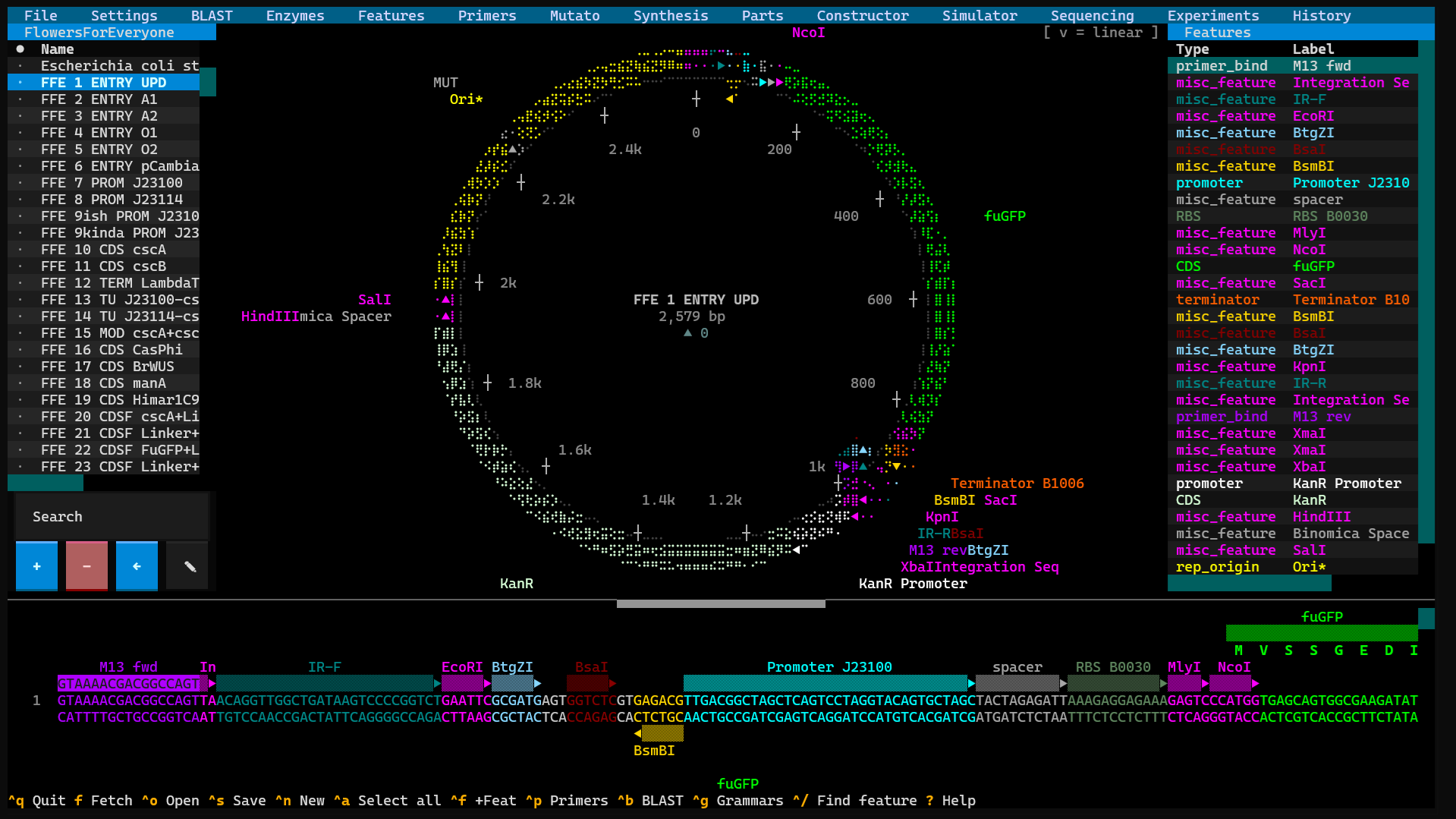
Why give it a try:
- Fast and local. No Electron, no web app, no login.
pipx install splicecraftand you're designing in seconds. - It does the whole job. View → edit → design → clone → simulate → verify → document — one tool that understands how those steps connect.
- It guards your data like it's irreplaceable (because it is — see below).
- It's scriptable. A 150+ endpoint local API and a stdlib CLI let an agent or a shell script drive every workflow.
pipx install splicecraft
splicecraft                      # empty canvas
splicecraft L09137               # fetch pUC19 from NCBI on launch
splicecraft myplasmid.gb         # local GenBank or .dna
x86-64 Linux, Intel macOS, and Windows install entirely from prebuilt
wheels — nothing to compile. On ARM64 Linux (Raspberry Pi / ARM cloud)
and Apple Silicon, one dependency (primer3-py) has no ARM wheel and
compiles at install, so install a C toolchain first:
sudo apt install build-essential python3-dev (Linux) or
xcode-select --install (macOS), then pipx install splicecraft.
On Windows, run SpliceCraft in Windows Terminal (the Windows 11
default) for the braille map — it auto-configures the console for UTF-8 +
ANSI at startup, so the map should render instead of garbling. (This
native-Windows path is implemented and CI-tested via mocks, but not yet
confirmed on real Windows hardware — see docs/PLATFORMS.md.)
If braille shows as
boxes (a font without those glyphs), toggle 'ASCII plasmid map' in
Settings → Display. See docs/PLATFORMS.md for the full
terminal matrix.
Press ? once running for the full keyboard-shortcut reference. See
docs/install.md for pip / uv / conda / source installs.
Your plasmid library is months — sometimes years — of work, so SpliceCraft is built to be a daily driver you never have to worry about:
- Your data is sacred. Every save is atomic (a crash can't leave a half-written file), backed up (
.bak+ rotating timestamps + daily snapshots), and guarded by a "suspicious shrink" refusal that won't replace a 156 MB library with an empty file. Name collisions always ask — skip / copy / overwrite — and self-updates snapshot everything first. - The biology is correct, and proven. Palindromes, Type IIS, origin-spanning cuts, wrap-around features, non-standard genetic codes (
/transl_table), reverse-complement, and IUPAC are pinned to the base — behind 4,000+ tests plus property-based fuzzing on the biology, crash-injection on the save path, and concurrency fuzzing on the data layer. Releases ship only when the whole suite is green. - We go looking for trouble. A long list of "sacred invariants" (
CLAUDE.md) and deep, multi-pass pre-release audits hunt edge cases, data-loss windows, races, and security gaps before they reach you.
Data-safety writeup: docs/data-safety.md ·
Security policy: SECURITY.md.
Everything hangs off a menu bar across the top, read left to right. The full
reference lives in docs/features.md; here's the gist.
Search without leaving the app (Ctrl+B). Local runs BLASTN / BLASTP /
HMMscan against your own library in-process — powered by pyhmmer, so there's
no external blast+ to install — with a one-click Pfam-A / NCBIfam (or any
HMMER3 URL) downloader. Online sends DNA / protein — or a whole plasmid or
single feature — to NCBI or EMBL-EBI Pfam and tables the hits, with a live
poll counter and a Cancel that really stops. Add to collection pulls a
highlighted nucleotide hit's full GenBank record straight from NCBI into a
plasmid collection you pick. (Native Windows: HMMscan needs WSL2; BLASTN/BLASTP
run in-process.)
Drive the restriction overlay — all sites, unique cutters, 6+/4+ bp, or just the Golden Braid connectors. Multi-cutters wear a live superscript cut-count (EcoRI², BsaI³) that ticks down as you edit a site out. Build named enzyme collections from the 200+ NEB catalog plus your own customs; the active collection scopes every scan. Your custom enzymes are now offered in every enzyme picker — the overlay list, the traditional-cloning and Golden-Braid / MoClo choosers — and the cloning-grammar editor accepts them too.
A library for your reusable annotations — promoters, RBSs, tags, CDSs. Capture
a region off any plasmid, then drop it onto another to annotate a selection
or splice the sequence in (the same store Synthesis and the Domesticator
use). Ctrl+F finds a subsequence — fuzzy, both strands — and n/N step
the hits, each pre-selected so Alt+Shift+F tags it on the spot. (Ctrl+/
searches features by name instead.)
A full-screen Primer3 designer for detection, cloning, Golden Braid, and generic primers, each with a Designed → Ordered → Validated lifecycle shown beside its plasmid. A fifth Primer Check tab runs in-silico PCR across your library (or just the active collection): one primer lists every plasmid it anneals to with the % identity, strand, and position; two primers add the amplicon length and the feature amplified, ranked by confidence (✓ / ⚠ / ~ / ✗). Binding is judged on the primer's 3′ end, so a 5′ cloning tail shows as lower identity rather than vanishing — click a result to open it on the canvas at the binding site.
The primer library organises into collections with a fuzzy search bar. Space cycles a primer's mark (★ select · $ cart · M move); MOVE / bulk-delete / re-status the marked sets, and export a collection or your $ cart to an order-ready CSV (then import one back). Marks track the primer itself, so filtering never strays them; malformed oligos are refused on export and skipped on import. Ctrl+C copies the highlighted primer's sequence (with a base-count toast).
Site-directed mutagenesis (with a hint of whimsy). Point at a CDS, name the
change (L54A), and SpliceCraft designs the SOE-PCR primers — falling back to a
2-primer modified-outer strategy near the ends, and only offering the shortcut
when the primer genuinely carries the change, so you never amplify wild-type by
accident. It also turns a pasted protein into a ready-to-order CDS:
frequency-matched codon optimization against your table, a stops selector
(1–3, honoring a trailing * run), and an Avoid sites picker that scrubs
chosen cut sites out of the CDS.
Its Scrub tab cures a whole plasmid of restriction sites with no cloning:
pick the enzymes (Type IIS by default) and SpliceCraft finds the minimal point
changes that kill each site — silent across every overlapping reading frame,
never spawning a new site, and reported when a site can't be cured silently.
Apply cure names and saves the cured plasmid (primers bound where they
anneal, drawn on the original as mismatches) and re-circularizes by
QuikChange (PCR → DpnI) or Golden Braid (BsaI-tailed fragments ligated
back together) — the Golden Braid route saves each PCR-… amplicon and really
digests + ligates them, so History reads as a genuine assembly.
A gene-synthesis composer in three tabs:
- DNA — a scrolling linear editor with anti-parallel strand markers, feature stripes, restriction overlay, and live AA translation, plus a feature-library side-pane (insert / annotate) and a feature-aware paste (copy a plasmid stretch and its features ride along).
- Protein — type or paste amino acids and watch codons fill in from your chosen table; a built-in motif library (His6, FLAG, HA, TEV, P2A, NLS, GS linkers, +30) inserts pre-colored tags. Optimize → DNA codon-optimizes (with Stops auto-tracking the trailing
*run and the same Avoid sites scrubbing) and hands the CDS to the DNA tab. The tabbed codon-table manager (also at Settings ▸ Codon Tables) builds tables from an NCBI genome (highly-expressed genes or whole-genome), a local CDS file (cds_from_genomic.fna/.gz, fully offline), Kazusa, or TSV, and a Chart tab draws any table as the classic genetic-code grid. - Operon Design — Synthetic Operon Construction turns the codon optimizer + a built-in pure-Python RBS engine into an expression-tuning bench: drop proteins into a lane, give each a target relative RBS strength, and Assemble reverse-designs every RBS in its real assembled context (under-drivable genes flagged), dropping a fully-annotated operon into the DNA tab. Native Operon Domestication lifts a natural operon (canvas / library / NCBI), cures the grammar's forbidden Type IIS sites (plus any extras you list) with primer-encoded synonymous edits, and clones it in with features intact.
Compose a part, hit Clone Fragment, and pick a path: a modular grammar
hands it to the Domesticator as an L0 block; Gibson or Traditional
open the Constructor with it pasted in. Saving a domesticated part files
three things in one dialog — the cloned plasmid, the orderable linear
fragment (FRAG-…, the primed amplicon with its domestication primers +
features drawn on it), and the parts bin the L0 part lands in — each into any
collection. Nothing on your canvas is touched until you save.
Your Parts Bin — the Level-0 building blocks for grammar-based assembly, in per-grammar bins. Multiple bins live side by side as collections, so a yeast toolkit and a plant toolkit never get mixed up.
The assembly bench: Traditional cloning, Gibson, Golden Braid, MoClo, or your own grammar, driven by a 4-source part picker. Every assembly, at every level, lands as one library entry (payload + overhangs + backbone) that carries every parent feature forward — so you can trace a finished L3 construct back to its L0 parts from the Library panel.
In-silico PCR and agarose gels. Pick a template, run the PCR, then save the
amplicon or send it to a gel lane. Gels render at 0.5–4% on a real
Helling–Goodman–Boyer mobility curve; stack lanes side by side, save a gel to
reload later, or cite it as &<gel> in your notebook.
Verify constructs against real reads. Drop in a Plasmidsaurus .zip — or
fetch a run by item code straight from the Plasmidsaurus API (the button on
the Sequencing screen; set credentials under Settings ▸ Plasmidsaurus API or via
the PLASMIDSAURUS_CLIENT_ID / PLASMIDSAURUS_CLIENT_SECRET env vars) — then walk
run → sample → target, and Align: the read lands as a colored bar (blue
match / red mismatch / gray gap) on the plasmid's linear map, named in place,
shaded by how much of each span actually binds so even a single-base mismatch
shows red. Click a read to jump the sequence panel to that exact spot.
Bulk auto-align matches a whole results folder in one pass, its confirm
window showing each read's real identity / mismatch / gap counts. The
Verification Report grades every construct (✓ verified / ⚠ near / ~ partial
/ ✗ divergent) in a sortable table; the Alignment Manager lists every stored
alignment (a true sub-100% identity never rounds up to "100%"); and the Library
shows per-plasmid Seq and Kind (○ plasmid · / fragment · ≈
amplicon · ρ protein) badges.
A genuine lab notebook in markdown: a split-pane editor, entries grouped into
projects (the way plasmids group into collections), and live colored
cross-references — type @plasmid, !action, or &gel and Ctrl+G jumps to
the source. Attach images, and spellcheck with F7 against a dictionary you can
grow.
Every plasmid remembers how it was made — Golden Braid, digest/ligation,
Gibson, PCR, or a plain edit. History opens with a Protocol — a
numbered recipe that reads left → right like the bench ("assemble pProm +
pCDS_GFP + pTerm into pENTR_L1 → TU_GFP ✂ Esp3I") — above a lineage tree you
can drill into as deep as you like. Each step is dated and shows its detail
(including the primers for a PCR); a backbone reused across branches is shown
once and then referenced. The lineage rides along through CommercialSaaS .dna
import / export too.
A chat assistant that lives in the terminal next to your plasmids. BABS is a
direct conversation with a local Ollama model — no
cloud, no API key, nothing leaves your machine — wearing the Babs chat UX:
streaming answers with markdown highlighting, reasoning (<think>) hidden by
default, a ❤ context lifebar that shows how much chat memory is left, and
slash commands (/help, /model, /system, /temp, /reset, /retry). The
transcript keeps a long, selectable, copy-pasteable history, and Ctrl+E
exports the whole conversation to markdown. Three tabs:
- Chat — ask anything; the answer streams in, contextually colored. Toggle
Corpus on (enabled once a Babs corpus exists) and answers come grounded
in your research corpus, with cited sources — the same hybrid retrieval Babs'
own
rag_botdoes, streamed into the chat. Off, it's a plain local-model chat. So you can grow a corpus in the Paper scraper and query it without leaving SpliceCraft. - Model — organize your models into collections, exactly like plasmids:
make/rename/delete collections, mark rows (Space) to move them between
collections or uninstall them in bulk, and file a model into a collection
before you've even pulled it. Every installed model is auto-filed into a
default "My Models" collection so nothing's hidden. Search HuggingFace for
GGUF models and add results to a collection, then pull on demand with a
live progress bar that shows bytes pulled and download speed (e.g.
1.2 GB / 5.5 GB · 21% · 18.4 MB/s) so you can see a multi-gigabyte model is really downloading. Use sets a model as the chat model. Deleting a marked model runsollama rm(behind a confirm — it frees disk and needs a re-pull). Everything runs over Ollama's local HTTP — no extra dependency. - Paper scraper — launch Babs'
real background paper search — Europe PMC plus OpenAlex, CORE, CGSpace and
DOAJ (all legitimately-open APIs) → re-index — to grow her knowledge corpus,
with a live, self-correcting "ingest running" indicator
and a jobs view + log tail. Switching models warns you (default No) that a
changed embedding model needs the corpus re-ingested to match, and can run
that re-embed for you. Shown only when the Babs repo is present (
~/babs, or$SPLICECRAFT_BABS_HOME).
The toolbar scrolls horizontally when the terminal is too narrow to fit every
menu, so BABS at the far right is always reachable. Requires Ollama running
locally (ollama serve); point elsewhere with $SPLICECRAFT_OLLAMA_HOST. New to
it? Run splicecraft babs-setup to clone + bootstrap the Babs engine (venv,
deps, models) in one command, and the Chat tab shows a numbered first-run
checklist whenever Ollama or a model is missing.
File opens / fetches (NCBI) / saves / exports (GenBank · FASTA · GFF3),
bulk-imports a folder, and restores from backup; every GenBank it writes stamps
a traceable Created by SpliceCraft v… COMMENT. It also hosts the selection →
cloning hub (Alt+Shift+P): highlight any DNA and pick Traditional,
Golden Braid / MoClo, or Gibson — each opens pre-loaded with the
selection and its features. The Traditional branch steers you to a working
enzyme pair (flagging sites inside the selection, or that the vector can't open
with), designs the cut-site-tailed primers, saves the named amplicon, then on
Simulate digests and gel-purifies so no primer-pad bases leak into the
clone. Migrate Data packages your entire setup (library, collections, parts,
primers, features, grammars, codon tables, settings, notebook, and history) into
one checksum-verified .zip to move between machines, and Master Delete is a
triple-gated full wipe. Settings collects every toggle plus launchers for
the grammar, entry-vector, enzyme-collection, and codon-table editors.
Want to script all of this? A 150+ endpoint localhost JSON API
(splicecraft --agent, or --headless for a no-UI / no-pty server with a
/healthz readiness probe) and a stdlib-only CLI (splicecraft-cli,
including a call passthrough to every endpoint) drive every workflow.
/tools self-describes each endpoint's full request schema. See
docs/agent-api.md and docs/cli.md.
Full feature reference: docs/features.md.
| Topic | Where |
|---|---|
| Install methods | docs/install.md |
| First five seconds with pUC19 | docs/getting-started.md |
| Full feature list | docs/features.md |
| Keybindings + menus | docs/keybindings.md |
| Data safety + backups | docs/data-safety.md |
| Agent API (HTTP) | docs/agent-api.md |
| CLI sidecar | docs/cli.md |
| Architecture | docs/architecture.md |
| Sacred invariants | CLAUDE.md |
| Contributing | CONTRIBUTING.md |
| Security policy | SECURITY.md |
| v1.0.0 acceptance gate | V1_GATE.md |
| Changelog | CHANGELOG.md |
| Release checklist | RELEASE_CHECKLIST.md |
python3 -m pytest -n auto -q                  # full suite (~5–6 min on 8 cores)
python3 -m pytest tests/test_dna_sanity.py    # biology correctness only (< 2 s)
python3 -m pytest tests/test_perf_regression.py  # perf gates (~3 s)
All tests run offline against synthetic SeqRecords and monkeypatched data
paths; the autouse _protect_user_data fixture in tests/conftest.py
guarantees no test can write to real user files.
SpliceCraft is actively maintained by a practicing bioengineer running real cloning workflows in it daily; releases typically go out the same week a problem surfaces at the bench. Issues and PRs welcome at github.com/Binomica-Labs/SpliceCraft/issues.
See CONTRIBUTING.md before opening a non-trivial PR — it
walks through the sacred invariants, the test cadence, and the
security-sensitive code surfaces.
MIT