




India's most complete Excel-native home loan simulator. Simulate EMI, tenure, prepayments, floating rate changes, and Section 24b/80C tax benefits — entirely in VBA, no add-ins.
| Section | Link |
|---|---|
| What this does | What this does |
| Screenshots | Screenshots |
| Features | Features |
| How it works | How it works |
| Getting started | Getting started |
| Sheet guide | Sheet guide |
| Prepayment modes | Prepayment modes |
| Tax benefits tracked | Tax benefits tracked |
| Scenario compare — what gets simulated | Scenario compare — what gets simulated |
| FAQ | FAQ |
| Contributing | Contributing |
| License | License |
It estimates your month-by-month home loan journey inside Excel.
It updates EMI, tenure, tax benefit, and balance after your prepayments.
It compares normal, planned, and stressed loan paths before you commit.
Key capabilities:
- ✅ Full amortization schedule with EMI calculations
- ✅ Multiple prepayment strategies (lump sum, extra EMI)
- ✅ Floating rate tracking and stress testing
- ✅ Section 24(b) and Section 80C tax benefit calculations
- ✅ Scenario comparison engine
- ✅ Annual summary rollups
- ✅ 100% Excel-native — no external dependencies


| Feature | What it does |
|---|---|
| Tool | Microsoft Excel macro-enabled workbook (.xlsm) |
| Language | VBA (100% codebase) |
| Code structure | Single LoanModule.bas file for all business logic |
| Purpose | Simulates Indian home loan cash flow and prepayment strategies |
| Sheets | Loan_Input, Loan_Schedule, Rate_Changes, Dashboard, Scenario_Compare, Annual_Summary |
| Core inputs | Loan amount, annual interest rate, tenure (years), start date, prepayment mode |
| Prepayment modes | REDUCE_EMI (lower monthly burden) and REDUCE_TENURE (faster closure) |
| Lump sum support | Month-wise lump sum prepayments |
| Extra EMI support | Month-wise extra EMI counts |
| Floating rate support | Month-wise rate changes with automatic recalculation |
| Tax tracking | Section 24(b) up to ₹2,00,000 and Section 80C up to ₹1,50,000 |
| Comparison engine | Base Loan, Your Plan EMI, Your Plan Tenure, and Rate Stress +2% scenarios |
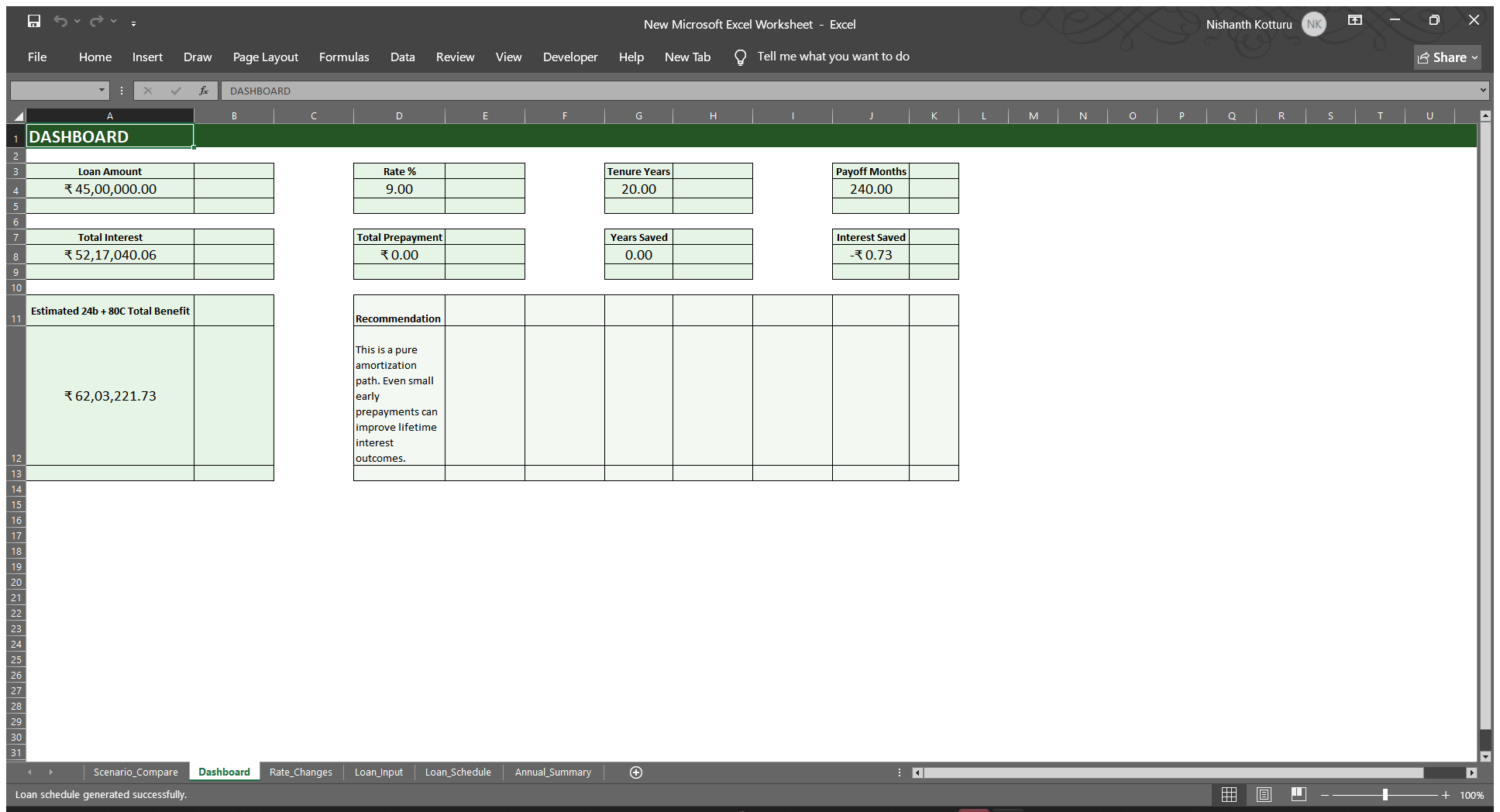
| Dashboard view | Loan Amount, Rate %, Tenure, Payoff Months, Total Interest, Total Prepayment, Years Saved, Interest Saved |
| Visualization | Interest vs Principal line chart by month |
| Number format | Indian lakh and crore style with ₹ symbol |
| Date labels | MMM-YYYY format based on loan start date |
| Interactive buttons | Generate Loan Schedule, Recalculate Schedule, Refresh Annual Summary |
| Compatibility | Excel 2016+ on Windows only |
| Dependencies | None — 100% native Excel, no add-ins or external tools |
- Setup: Run the setup macro once to build the workbook structure
- Input: Enter loan details, start date, and any prepayment plan in
Loan_Input - Generate: Run the schedule macro to compute sheets, chart, taxes, and comparisons
The VBA engine automatically:
- Calculates month-by-month amortization
- Applies prepayments in your chosen mode
- Tracks floating rate changes
- Computes tax-eligible amounts
- Runs scenario comparisons
- Generates summary reports
| Requirement | Details |
|---|---|
| Operating system | Windows only |
| Excel version | Excel 2016 or later |
| Macro setting | Macros must be enabled |
| Additional software | None required |
- Download
HomeLoanStrategyLab.xlsmfrom the Releases tab - Open in Excel. Click Enable Macros when prompted
- Go to Developer tab → Macros → run SetupLoanCalculator once
- Fill your loan details in the Loan_Input sheet
- Click Generate Loan Schedule
- Review the Dashboard and Scenario_Compare sheets
Loan Amount: ₹50,00,000
Annual Rate: 6.5%
Tenure: 20 years
Start Date: Jan 2024
Mode: REDUCE_TENURE
Prepayment: ₹50,000 every 6 months
Run the schedule and see your payoff months, interest savings, and tax benefits automatically calculated.
The control panel for the entire simulation.
- Loan Amount: Principal borrowed (in ₹)
- Annual Interest Rate: Fixed or current floating rate (%)
- Tenure: Loan duration in years
- Start Date: When the loan begins
- Prepayment Mode:
REDUCE_EMIorREDUCE_TENURE - Prepayment Schedule: Month-wise lump sum or extra EMI counts
The full amortization schedule showing every month of the loan.
- Month: Sequence number from loan start
- Date: Calendar month and year
- Principal: Amount paid toward principal
- Interest: Amount paid toward interest
- EMI: Equated monthly installment
- Balance: Outstanding principal after the month
- Lump Sum: Optional prepayment (editable)
- Extra EMI: Optional additional EMI counts (editable)
- Tax tracking: Section 24(b) and 80C eligible amounts
After editing lump sums or extra EMIs, click Recalculate Schedule to update dependent columns.
Stores future floating rate changes.
- Month Number: When the rate change takes effect (e.g., month 13)
- New Annual Rate: The revised interest rate (%)
Example: If your bank cuts rates at month 25, enter 25 in Month Number and the new rate in New Annual Rate. Click Recalculate Schedule to regenerate the loan plan.
The executive summary with key metrics and a quick recommendation.
Shows:
- Payoff period (months and years)
- Total interest over the loan life
- Total prepayment amount
- Years saved vs. base loan
- Interest saved vs. base loan
- Estimated tax benefit for the fiscal year
- Interest vs Principal chart showing cash flow composition by month
Side-by-side comparison of four loan strategies.
- Base Loan: No prepayments, baseline tenure and interest
- Your Plan EMI: Your prepayment plan applied with EMI reduction
- Your Plan Tenure: Your prepayment plan applied with tenure reduction
- Rate Stress +2%: Your prepayment plan under a hypothetical +2% rate increase
Use this to evaluate trade-offs in cash flow relief vs. interest savings.
Groups monthly results into loan years (financial year or calendar year).
Shows year-by-year:
- Annual EMI (sum of 12 months)
- Annual interest paid
- Annual principal paid
- Section 24(b) tax benefit
- Section 80C deduction eligible
- Year-end balance
Useful for tax planning and year-by-year reviews.
| Mode | EMI | Tenure | Best for |
|---|---|---|---|
| REDUCE_EMI | Falls after prepayment | Stays fixed | Lower monthly cash burden |
| REDUCE_TENURE | Stays steady | Shortens after prepayment | Faster loan closure and interest savings |
Example:
- Original loan: ₹50 lakh at 7% over 20 years = ₹388/month EMI
- After ₹10 lakh prepayment under REDUCE_EMI: EMI drops to ~₹310/month, tenure stays 20 years
- After ₹10 lakh prepayment under REDUCE_TENURE: EMI stays ₹388/month, tenure drops to ~15 years
- Annual cap: ₹2,00,000 per financial year
- Eligibility: Interest paid on home loans (self-occupied or let-out property)
- How it's computed: Monthly interest is tracked and capped at ₹2,00,000 per FY
- In the tool: Visible in
Loan_Schedulecolumn P and yearlyAnnual_Summary
- Annual cap: ₹1,50,000 per financial year
- Eligibility: Principal repayment amount (only)
- How it's computed: Monthly principal is tracked and capped at ₹1,50,000 per FY
- In the tool: Visible in
Loan_Schedulecolumn Q and yearlyAnnual_Summary
Note: These are indicative calculations. Consult a tax advisor for your specific situation, as eligibility depends on property classification and lender type.
| Scenario | Prepayments used | Mode | What it tests |
|---|---|---|---|
| Base Loan | None | REDUCE_TENURE | Baseline path — no prepayment impact |
| Your Plan EMI | Your lump sum + extra EMI plan | REDUCE_EMI | Cash flow relief after prepayment |
| Your Plan Tenure | Your lump sum + extra EMI plan | REDUCE_TENURE | Fastest payoff with your prepayments |
| Rate Stress +2% | Your lump sum + extra EMI plan | REDUCE_TENURE | Resilience under rate increase scenario |
Use case: Compare interest saved vs. EMI reduced across all four paths to make an informed prepayment strategy.
Do I need to install anything beyond Excel?
No. It runs as a native Excel VBA workbook. No add-ins, no Python, no external tools, no dependencies.
Does this work on Mac?
No. VBA macro execution and the Scripting.Dictionary object require Windows. Excel on Mac does not support this workbook.
Can I use this for a loan that has already started?
Yes. Enter your original loan start date and current outstanding principal as the loan amount. The schedule will run from month 1 of your inputs.
What happens when my bank changes my floating rate?
Open the `Rate_Changes` sheet. Enter the month number when the change takes effect and the new annual rate. Click **Recalculate Schedule**.
Is my data sent to any server?
No. This is a local Excel file with no network calls. Nothing leaves your machine.
Can I modify the VBA code?
Yes. All business logic lives in `LoanModule.bas` — a single, clearly structured file. Fork, modify, and use freely under the MIT License.
What if I find a bug or want to suggest a feature?
Please [open an issue](https://github.com/Nishanth20/India-home-loan-simulator-excel/issues/new) on GitHub with a description, and we'll review it.
Is there a way to compare multiple loan offers?
Yes. Create separate copies of the workbook, fill in each bank's terms, and run the simulations. Compare the `Dashboard` sheets side by side.
This tool is ideal for:
- New homebuyers: Evaluate prepayment strategies before signing the loan agreement
- Existing borrowers: Plan prepayments and understand tax deductions
- Financial planners: Model loan scenarios for clients
- Excel enthusiasts: Learn VBA macros and financial modeling in Excel
- Tax planning: Track Section 24(b) and 80C deductions year by year
- Codebase: 100% VBA, single module (
LoanModule.bas) - Data structure: Uses Scripting.Dictionary for efficient lookups
- Recalculation: Click buttons to regenerate entire simulation
- Performance: Handles up to 360-month loans (30 years) instantly
Pull requests are welcome. All business logic lives in LoanModule.bas — it is one file, clearly structured, and easy to read and fork.
Areas for contribution:
- Enhanced tax calculations (Section 80D, other deductions)
- Additional scenarios (co-borrower, joint loans)
- Mac compatibility exploration
- New visualization formats
- Bug fixes and optimizations
If you find a bug or want to suggest a feature, please open an issue.
This tool is provided as-is for educational and planning purposes only. The calculations are indicative and based on the inputs you provide. Please consult:
- Your bank or lender for official loan terms
- A tax advisor for deduction eligibility and compliance
- A financial advisor for personalized loan strategy recommendations
MIT — See LICENSE file for details.
Made for Indian homebuyers. Entirely in Excel. No add-ins. No dependencies.
Questions? Open an issue or reach out. Happy loan planning! 🏠