




Smart Home Energy Monitoring System using Python-based virtual sensors and a real-time web dashboard. Designed to demonstrate IoT concepts including ESP32, MQTT, energy analytics, alerts, and cloud dashboards without requiring physical hardware.
Homes and small businesses have no visibility into where electricity goes. This project delivers utility-grade per-circuit energy insights using low-cost, non-invasive sensors — no electrician required for the electronics side.
This project simulates a smart home energy monitoring system that tracks electrical consumption, estimates cost, detects overload conditions, and visualizes data on a live dashboard.
Although no physical hardware is used during execution, the project includes complete ESP32 firmware, MQTT architecture, and circuit diagrams showing how the system would work in a real deployment.
SCT-013 Clamp
     │
     ▼
Bias + RC Filter
     │
     ▼
ESP32 ADC (RMS sampling @ 4 kHz)
     │
     ▼
JSON payload via MQTT (PubSubClient)
     │
     ├──► Home Assistant (alerts, automations)
     │
     └──► Telegraf → InfluxDB → Grafana (historical charts)

Python Simulation (no hardware needed):
     simulator.py → MQTT / CSV → report_generator.py → PDF


| Hardware | Purpose |
|---|---|
| ESP32-DevKitC | MCU — Wi-Fi, ADC, MQTT |
| SCT-013-050 current clamp | Non-invasive AC current sensing |
| 2× 10kΩ, 100kΩ, 100Ω | Bias divider + protection |
| 10µF + 0.1µF capacitors | Bias decoupling + anti-alias filter |
| 3.5mm audio jack | Clamp connector |
| ADS1115 (optional) | 16-bit ADC for multi-channel |
| Buzzer / LED (optional) | Local alert indicator |
| Software | Purpose |
|---|---|
| Arduino ESP32 core | Firmware |
| PubSubClient | MQTT publishing |
| Eclipse Mosquitto | MQTT broker |
| InfluxDB v2 | Time-series storage |
| Telegraf | MQTT → InfluxDB bridge |
| Grafana | Dashboard & charts |
| Home Assistant | Automations & alerts |
| Python 3.10+ | Simulation & reports |
| paho-mqtt | Python MQTT client |
| reportlab | PDF report generation |
Smart-Home-Energy-Monitoring-System/
│
├── arduino_code/
│   └── main.cpp
│
├── dashboard/
│   ├── energy.html
│   ├── docker-compose.yml
│   ├── home_assistant_sensors.yaml
│   ├── telegraf.conf
│   └── mosquitto/
│
├── data/
│   ├── energy_data.json
│   └── energy_log.csv
│
├── python_simulation/
│   ├── simulator.py
│   ├── live_simulator.py
│   └── report_generator.py
│
├── outputs/
│   └── energy_report.pdf
│
├── circuit_diagram/
│   └── wiring_guide.md
│
├── docs/
│   └── interview_qa.md
│
├── main.py
├── requirements.txt
└── README.md
# 1. Clone
git clone https://github.com/Sonia068/Smart-Home-Energy-Monitoring-System
cd Smart-Home-Energy-Monitoring-System

# 2. Install dependencies
pip install -r requirements.txt

# 3. Run normal simulation (30 readings, ~30 seconds)
python main.py

# 4. Run overload scenario + generate PDF report
python main.py --mode overload --readings 20 --report

# 5. All modes
python main.py --mode normal    # everyday household
python main.py --mode high      # heavy appliances
python main.py --mode overload  # triggers alerts
python main.py --mode multi     # 6 mixed appliances

# 6. Report only (from saved CSV)
python main.py --report-only# Start Mosquitto + InfluxDB + Grafana + Telegraf
cd dashboard
docker compose up -d
# Check all services running
docker compose ps
# View Grafana at http://localhost:3000 (admin/admin)
# View InfluxDB at http://localhost:8086
# Run simulator pointing to local broker
cd ..
python main.py --mode multi --readings 120See detailed steps in Hardware Execution section below.
Arduino IDE → File → Preferences → Board Manager URLs:
https://raw.githubusercontent.com/espressif/arduino-esp32/gh-pages/package_esp32_index.json

Tools → Board → Boards Manager → search "esp32" → Install
Sketch → Include Library → Manage Libraries:
- PubSubClient  (knolleary)
- Adafruit ADS1X15  (optional, for external ADC)
Edit arduino_code/main.cpp:
const char* WIFI_SSID = "YOUR_HOME_WIFI";
const char* WIFI_PASS = "YOUR_PASSWORD";
const char* MQTT_HOST = "192.168.1.10"; // your broker IPTools → Board → ESP32 Dev Module
Tools → Port → COM3 (or /dev/ttyUSB0 on Linux)
Sketch → Upload
Follow circuit_diagram/wiring_guide.md.
Ask a licensed electrician to place the clamp on the mains wire.
- Plug in a known load (e.g., a 60 W bulb).
- Open Serial Monitor (115200 baud).
- Expected current = 60 / 230 = 0.261 A.
- If reading is off, type:
CAL:0.XXXXXin Serial Monitor to set new factor.
cd dashboard
docker compose up -dPaste dashboard/home_assistant_sensors.yaml into Home Assistant's
configuration.yaml and restart HA.
=== Smart Home Energy Monitor ===
Active Appliances:
  • LED Lights             40W  PF=0.95
  • Ceiling Fan            75W  PF=0.85
  • Laptop                 65W  PF=0.90
  TOTAL                   180W

[  1/ 30] 2025-08-14T10:00:01  MODE=NORMAL   V= 229.3V  I=  0.791A  P=   181.4W  ██  ΣkWh=0.0001  ₹0.0004
[  2/ 30] 2025-08-14T10:00:02  MODE=NORMAL   V= 231.1V  I=  0.778A  P=   179.9W  █   ΣkWh=0.0001  ₹0.0008
...
[  8/ 30] ... ⚠ ALERT
         ↳ SPIKE: Transient load spike detected
| Parameter | Formula |
|---|---|
| RMS Current | Irms = √( Σ(i²) / N ) |
| Apparent Power | S (VA) = Irms × Vnominal |
| Energy (interval) | ΔWh = S(W) × Δt(s) / 3600 |
| Cumulative kWh | kWh = ΣΔWh / 1000 |
| Cost | ₹ = kWh × tariff (₹8/kWh) |
| Sector | Application |
|---|---|
| Smart Homes | Per-appliance usage, bill splitting |
| Hostels / PGs | Tenant sub-metering |
| Commercial Buildings | HVAC & lighting baselines, peak shaving |
| Factories | Motor health monitoring, overload detection |
| Solar Companies | Net metering, consumption vs. generation |
| Building Automation | SCADA-like dashboards at low cost |
- Appliance-level NILM (non-intrusive load monitoring)
- Mobile app (Flutter / React Native)
- AI/ML energy forecasting
- Solar generation vs. consumption overlay
- Voice assistant integration (Alexa / Google)
- Automated load shedding relay control
- OTA firmware updates (ArduinoOTA)
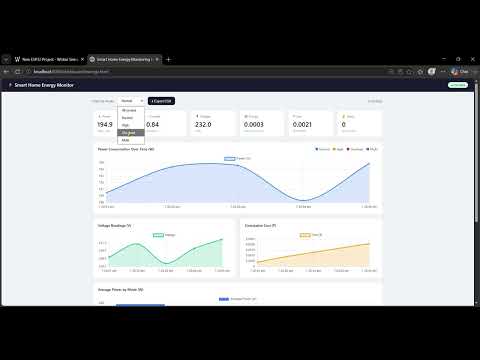
👉 Click the image above to watch the full demo of the Smart Home Energy Monitoring System
pip install -r requirements.txtcd python_simulation
python live_simulator.pyThe simulator continuously updates:
- energy_data.json
- energy_log.csv
Power:
Power (W) = Voltage × Current
Energy:
Energy (Wh) = Power × Time / 3600
Cost:
Cost = kWh × ₹8 per unit
Live dashboard update Power analytic Voltage monitorin Energy calculatio Cost estimatio Overload detectio Alert loggin CSV expor PDF report generatio ESP32 firmware include Circuit diagram included
The project includes complete implementation files for:
SCT-013 Current Sensor
        │
        ▼
ESP32 ADC
        │
        ▼
MQTT Broker
        │
        ▼
InfluxDB
        │
        ▼
Grafana Dashboard
        │
        ▼
Home Assistant Alerts
Sonia Thakur
- GitHub: @Sonia068
- LinkedIn: https://www.linkedin.com/in/sonia-thakur-6ab93b349/
⭐ If you found this project helpful, please give it a star!