







A VS Code extension for quickly browsing and editing YOLO dataset annotations. This extension allows you to efficiently view and modify YOLO-formatted labels through YAML configuration files, making it easy to manage your computer vision datasets directly within VS Code.
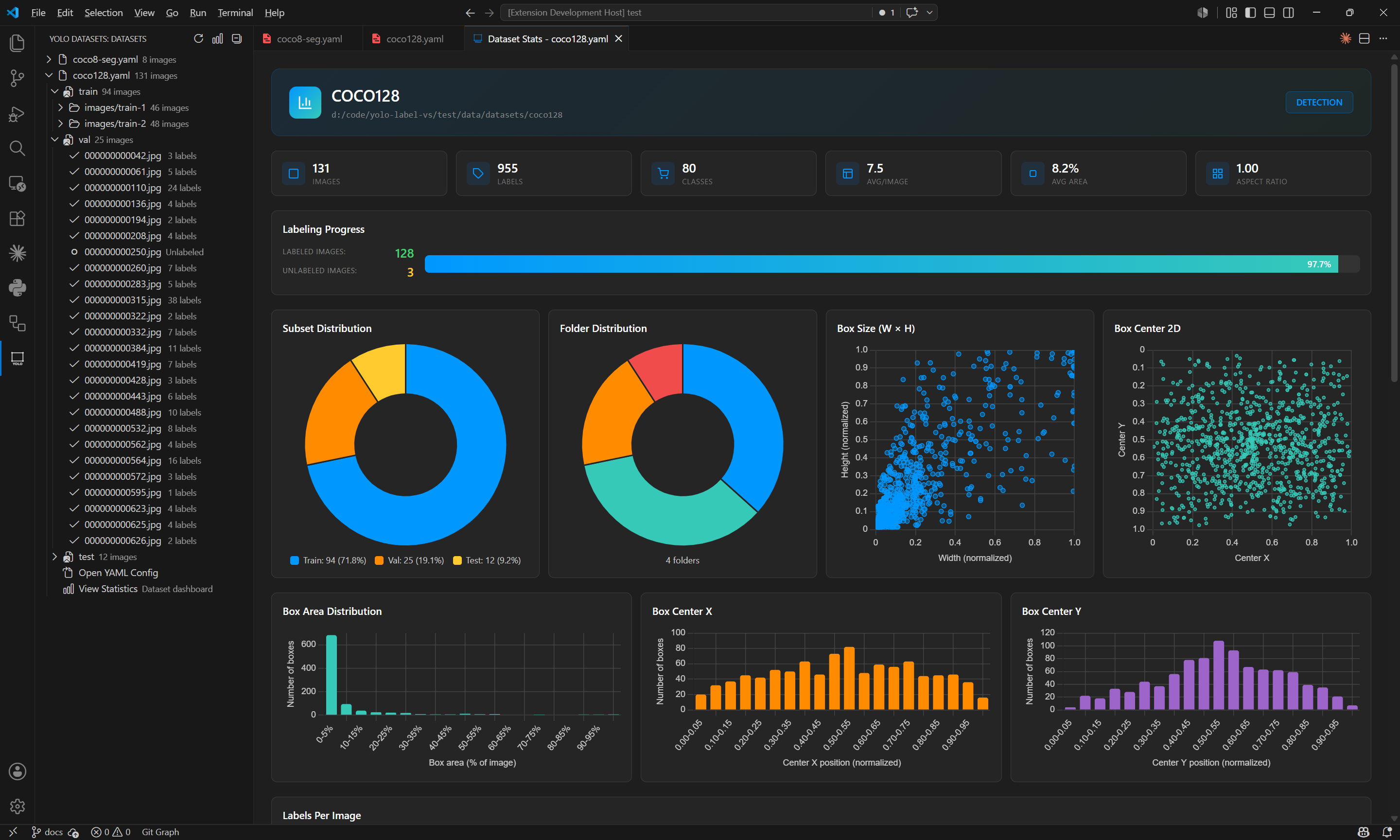
Visualize comprehensive dataset analytics with interactive charts powered by Chart.js:
- Class Distribution: Pie chart and bar chart showing label distribution
- Train/Val/Test Comparison: Side-by-side class distribution across subsets
- Box Statistics: Size histogram, aspect ratio analysis, and center position heatmaps
- Labels Per Image: Histogram showing label count distribution
- Folder Distribution: Breakdown of images across subdirectories
Our extension seamlessly integrates with all VS Code themes for a consistent experience:
 |
 |
 |
 |
 |
 |
- English
- 中文文档
- AI-Powered Inference: Load ONNX models to automatically detect objects in images with configurable confidence and IoU thresholds
- Dataset Explorer TreeView: Browse your datasets directly in the VS Code sidebar - organized by YAML config, train/val/test subsets, and individual images
- Dataset Statistics Dashboard: Comprehensive visualization of label distribution, class counts, box statistics, and Train/Val/Test comparison charts
- Quick Dataset Browsing: Instantly view YOLO-labeled images through YAML configuration files
- Efficient Label Management: Easily modify existing labels without leaving VS Code
- Redesigned Sidebar UI: Collapsible Class selector with search and interactive Labels list with type indicators (BOX/SEG/POSE)
- Intuitive Preview: Real-time visualization of bounding boxes and labels
- Streamlined Navigation: Quick movement between images using keyboard shortcuts
- YAML Integration: Direct support for YAML configuration files
- Batch Processing: Browse and edit multiple images in sequence
- Copy/Paste Labels: Quickly duplicate labels with Ctrl+C/Ctrl+V shortcuts
- Multi-Folder Subset Support: Visualize datasets with multiple folder sources organized by subdirectory
Currently supported YOLO inference models:
| Model | Task | Status |
|---|---|---|
| YOLOv8 | Detection (det) | ✅ Supported |
| YOLOv8 | Segmentation (seg) | ✅ Supported |
| YOLOv11 | Detection (det) | ✅ Supported |
| YOLOv11 | Segmentation (seg) | ✅ Supported |
Note: Only ONNX format models are supported. Export your PyTorch models to ONNX using Ultralytics before loading.
| Category | Format | Status | Description |
|---|---|---|---|
| Detection | COCO8 | ✅ Supported | A small dataset with 8 COCO images (4 train, 4 val) for object detection |
| COCO128 | ✅ Supported | First 128 images of COCO train2017 dataset for object detection testing | |
| Segmentation | COCO8-seg | ✅ Supported | 8 COCO images with instance segmentation annotations |
| Pose | COCO8-pose | ✅ Supported | 8 COCO images with keypoints annotations for pose estimation |
| Tiger-pose | ✅ Supported | 263 tiger images with 12 keypoints per tiger | |
| OBB | DOTA8 | ✅ Supported | Small subset of 8 aerial images with oriented bounding boxes (uses segmentation mode) |
| Classification | MNIST160 | ❌ Not Planned | First 8 images of each MNIST category (160 images total) |
| ImageNet-10 | ❌ Not Planned | Smaller subset of ImageNet with 10 categories | |
| Multi-Object Tracking | VisDrone | ❌ Not Planned | Drone imagery for tracking multiple objects across frames |
Ultralytics supports a comprehensive range of datasets
Detection · Segmentation · Pose · Classification · Tracking

COCO · VOC · ImageNet · DOTA · and many more
- Simplified Workflow: No need to switch between different tools - view and edit YOLO datasets directly in VS Code
- Developer-Friendly: Perfect for ML engineers who want to quickly verify or adjust their YOLO datasets
- Lightweight: Fast and responsive, designed for handling large datasets
- Integrated Experience: Seamlessly fits into your development environment
- Visual Studio Code 1.85.0 or higher
- Image files in your workspace
- YAML configuration files for YOLO annotations
- Open VS Code
- Press
Ctrl+Pto open the Quick Open dialog - Type
ext install andaoai.yolo-labeling-vs - Press Enter to install
Or you can install it directly from the VS Code Marketplace.
- Open your YOLO dataset folder in VS Code
- The extension automatically scans for YAML configuration files
- Find the "YOLO Datasets" panel in the VS Code sidebar
- Expand datasets to browse Train/Val/Test subsets and individual images
- Click any dataset, subset, or image to open the labeling panel directly
- Use the refresh button to rescan for dataset changes
- Right-click a YAML file or use the dataset TreeView
- Select "View Statistics" to open the analytics dashboard
- Visualize:
- Overview: Total images, labeled/unlabeled counts, average labels per image
- Class Distribution: Pie chart and bar chart showing label distribution
- Train/Val/Test Comparison: Side-by-side class distribution across subsets
- Box Statistics: Size histogram, aspect ratio, and center position heatmaps
- Labels Per Image: Histogram showing label count distribution
- Folder Distribution: Breakdown of images across subdirectories
- Open a folder containing your YAML configuration files and corresponding images
- Right-click on a YAML file in the explorer
- Select "Open YOLO Labeling Panel"
- Browse through your labeled images and make adjustments as needed
- Sidebar: Collapsible sections for Class selection (with search) and Labels list (with type indicators)
- Previous/Next Image: Navigate through images in the dataset
- Mode Selector: Switch between Box, Segmentation, and Pose labeling modes
- Show Labels: Toggle visibility of labels on the image
- Save Labels: Save current annotations to disk
- Search Box: Search for specific images in the dataset
- Model Panel: Load ONNX models and run AI inference for automatic object detection
- Load/Change Model: Select .onnx model file
- Confidence Threshold: Adjust detection confidence (0.05-0.95)
- IoU Threshold: Adjust Non-Maximum Suppression overlap (0.1-0.9)
- Run Inference: Detect objects in current image
- Accept/Reject: Add or discard detected objects as labels
Ctrl+Y: Open YOLO Labeling Panel
Tab: Switch to next label classShift+Tab: Switch to previous label classSpace: Reset image zoom and positionCtrl + Mouse Hover: Highlight box, segmentation, or pose annotationsCtrl + Mouse Drag: Move highlighted annotationD: Go to next imageA: Go to previous imageCtrl+S: Save labelsCtrl+Z: Undo the last labeling actionCtrl+Y: Redo the last undone actionCtrl+C: Copy hovered labelCtrl+V: Paste copied labelCtrl+Wheel: Zoom in/out at mouse positionAlt+Drag: Pan the image when zoomed inWheel: Scroll vertically when zoomed inShift+Wheel: Scroll horizontally when zoomed inEsc: Cancel current drawing operation (in segmentation or pose mode)
-
Segmentation Mode:
Left Mouse Click: Add polygon pointRight Mouse Click: Cancel polygon drawing
-
Pose Mode:
Left Mouse Click: Annotate fully visible keypoint (visibility=1)Right Mouse Click: Annotate occluded keypoint (visibility=2)Esc: Cancel current pose annotation
Arrow Down: Move down through search resultsArrow Up: Move up through search resultsEnter: Select the highlighted search resultEscape: Close search results panel
This extension contributes the following commands:
yolo-labeling-vs.openLabelingPanel: Open YOLO Labeling Panelyolo-labeling-vs.openDatasetStats: Open Dataset Statistics Dashboardyolo-labeling-vs.refreshDatasets: Refresh Dataset TreeView
Please report issues on our GitHub repository.
For detailed release notes and version history, please see the CHANGELOG.md file.
We welcome contributions! Please feel free to submit a Pull Request.
If you find this extension helpful, consider supporting its development:
| WeChat Pay | Alipay |
|---|---|
 |
 |
This project is licensed under the MIT License - see the LICENSE file for details.
If you encounter any problems, please file an issue at our issue tracker.