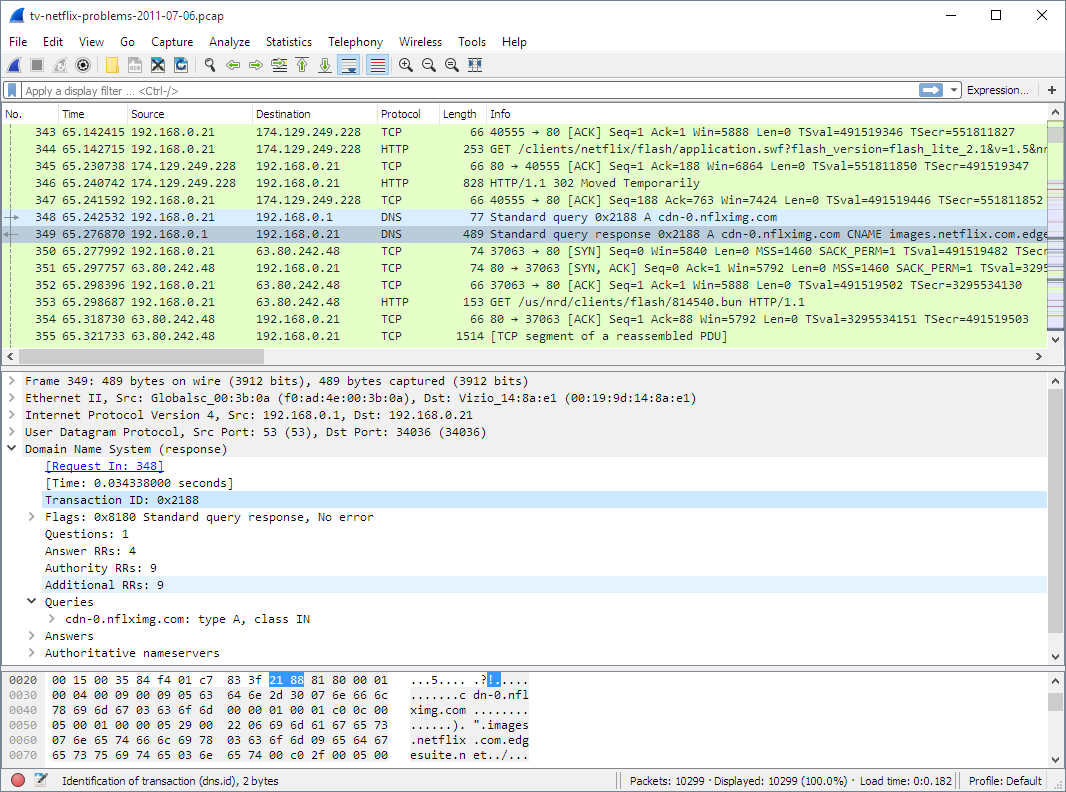

This project demonstrates comprehensive network traffic analysis using Wireshark to monitor device communications, detect anomalies, and identify potential security threats. The analysis focuses on understanding network protocols, mapping communication patterns, and investigating packet-level details to assess data transmission integrity and security posture.
Duration: June 2024
Focus Area: Network Traffic Analysis (NTA) and Security Monitoring
Tool: Wireshark Network Protocol Analyzer
- Capture and analyze network traffic to monitor device communications
- Identify communication patterns and potential security threats
- Understand protocol behavior and data flow mechanisms
- Apply filtering techniques for efficient packet analysis
- Investigate packet details for integrity assessment
- Detect unauthorized access attempts and security risks
- Input: Live network traffic from various network interfaces
- Output: Comprehensive packet captures (.pcap files) for analysis
- Result: Complete visibility into network communications and device interactions
- Input: Raw packet data with source and destination IP addresses
- Output: Mapped communication flows and network topology insights
- Result: Clear understanding of device interactions and potential threat vectors
- Input: Mixed protocol traffic (TCP, DHCP, ICMPv6, ARP)
- Output: Detailed protocol behavior analysis and data flow documentation
- Result: Enhanced understanding of network protocols and their security implications
- Input: Large packet captures with mixed traffic types
- Output: Isolated, relevant packets for specific analysis
- Result: Improved efficiency in identifying and investigating network events
- Input: Detailed packet structures and payload data
- Output: Integrity verification and transmission quality analysis
- Result: Confidence in data transmission reliability and detection of anomalies
- Input: ARP requests and network device interactions
- Output: Identified unauthorized access attempts and security vulnerabilities
- Result: Enhanced network security posture and threat awareness
# Capture traffic on specific interface
wireshark -i eth0

# Capture with specific filter
wireshark -i eth0 -f "host 192.168.1.100"

# Capture to file
wireshark -i eth0 -w capture_file.pcap

# Capture with ring buffer (multiple files)
wireshark -i eth0 -w capture_%Y%m%d_%H%M%S.pcap -b filesize:100000

# Capture with time limit
wireshark -i eth0 -a duration:300# Filter TCP traffic
tcp
# TCP connections to specific port
tcp.port == 80
tcp.port == 443
tcp.port == 22
# TCP flags analysis
tcp.flags.syn == 1
tcp.flags.ack == 1
tcp.flags.fin == 1
tcp.flags.rst == 1
# TCP connection states
tcp.flags.syn == 1 and tcp.flags.ack == 0 # SYN packets
tcp.flags.syn == 1 and tcp.flags.ack == 1 # SYN-ACK packets
tcp.flags.fin == 1 # FIN packets
# TCP sequence number analysis
tcp.seq
tcp.ack
tcp.len > 0
# DHCP traffic
dhcp

# Specific DHCP message types
dhcp.option.dhcp == 1    # DHCP Discover
dhcp.option.dhcp == 2    # DHCP Offer
dhcp.option.dhcp == 3    # DHCP Request
dhcp.option.dhcp == 5    # DHCP ACK

# DHCP client identification
dhcp.option.hostname
dhcp.option.client_id
dhcp.option.requested_ip

# DHCP lease information
dhcp.option.ip_address_lease_time
dhcp.option.server_identifier
# ICMPv6 traffic
icmpv6

# ICMPv6 message types
icmpv6.type == 128       # Echo Request
icmpv6.type == 129       # Echo Reply
icmpv6.type == 135       # Neighbor Solicitation
icmpv6.type == 136       # Neighbor Advertisement
icmpv6.type == 133       # Router Solicitation
icmpv6.type == 134       # Router Advertisement

# ICMPv6 error messages
icmpv6.type == 1         # Destination Unreachable
icmpv6.type == 3         # Time Exceeded
icmpv6.type == 4         # Parameter Problem
# ARP traffic
arp

# ARP request and reply
arp.opcode == 1          # ARP Request
arp.opcode == 2          # ARP Reply

# Specific ARP analysis
arp.src.hw_mac
arp.src.proto_ipv4
arp.dst.hw_mac
arp.dst.proto_ipv4

# ARP spoofing detection
arp.src.proto_ipv4 == arp.dst.proto_ipv4
# IP address filtering
ip.src == 192.168.1.100
ip.dst == 192.168.1.1
ip.addr == 192.168.1.0/24

# Port filtering
tcp.srcport == 80
tcp.dstport == 443
udp.port == 53

# Protocol filtering
http
https
dns
ftp
ssh

# Size-based filtering
frame.len > 1000
tcp.len > 100

# Time-based filtering
frame.time >= "2024-06-01 10:00:00"
frame.time <= "2024-06-01 11:00:00"
# Suspicious traffic patterns
tcp.flags.syn == 1 and tcp.flags.ack == 0 and tcp.len == 0  # SYN flood
tcp.flags.rst == 1                                          # Connection resets
tcp.analysis.retransmission                                 # Retransmissions
tcp.analysis.duplicate_ack                                  # Duplicate ACKs

# Unusual port activity
tcp.port > 1024 and tcp.port < 49152
udp.port > 1024 and udp.port < 49152

# Broadcast and multicast analysis
eth.dst == ff:ff:ff:ff:ff:ff  # Broadcast frames
ip.dst == 255.255.255.255     # IP broadcast
ip.dst >= 224.0.0.0 and ip.dst <= 239.255.255.255  # Multicast

# DNS analysis
dns
dns.qry.type == 1            # A records
dns.qry.type == 28           # AAAA records
dns.qry.type == 12           # PTR records
dns.flags.response == 0      # DNS queries
dns.flags.response == 1      # DNS responses
# Statistical analysis
# Tools > Statistics > Protocol Hierarchy
# Tools > Statistics > Conversations
# Tools > Statistics > Endpoints

# Export specific data
# File > Export Objects > HTTP
# File > Export Objects > DICOM
# File > Export Specified Packets

# Follow TCP streams
# Right-click packet > Follow > TCP Stream

# Expert analysis
# Analyze > Expert Info# Basic capture with tshark
tshark -i eth0 -w output.pcap
# Capture with filters
tshark -i eth0 -f "host 192.168.1.100" -w filtered.pcap
# Read and analyze existing capture
tshark -r capture.pcap -Y "tcp.port == 80"
# Extract specific fields
tshark -r capture.pcap -T fields -e ip.src -e ip.dst -e tcp.port
# Statistical analysis
tshark -r capture.pcap -q -z conv,tcp
tshark -r capture.pcap -q -z endpoints,ip
tshark -r capture.pcap -q -z proto,col
# Export to different formats
tshark -r capture.pcap -T json > output.json
tshark -r capture.pcap -T csv > output.csv# Get capture file information
capinfos capture.pcap
# Detailed statistics
capinfos -i capture.pcap
# Multiple files analysis
capinfos *.pcap
# Time analysis
capinfos -t capture.pcap# Extract specific time range
editcap -A "2024-06-01 10:00:00" -B "2024-06-01 11:00:00" capture.pcap filtered.pcap
# Split large capture files
editcap -c 1000 capture.pcap split_capture.pcap
# Remove duplicate packets
editcap -d capture.pcap dedup_capture.pcap# Determine network interface
ip link show
ifconfig
# Start capture with appropriate filters
wireshark -i eth0 -f "not broadcast and not multicast"# Monitor for suspicious activity
tcp.flags.syn == 1 and tcp.flags.ack == 0
arp.opcode == 1 and arp.src.proto_ipv4 == 0.0.0.0
icmpv6.type == 135
# Generate comprehensive report
tshark -r capture.pcap -q -z conv,tcp -q -z endpoints,ip -q -z proto,col > analysis_report.txt

# Extract suspicious patterns
tshark -r capture.pcap -Y "tcp.analysis.retransmission" -T fields -e frame.time -e ip.src -e ip.dst# Port scanning patterns
tcp.flags.syn == 1 and tcp.flags.ack == 0
ip.src == <suspicious_ip> and tcp.port >= 1 and tcp.port <= 1024
# ARP scanning
arp.opcode == 1
arp.src.proto_ipv4 == <suspicious_ip>
# SYN flood
tcp.flags.syn == 1 and tcp.flags.ack == 0 and tcp.len == 0

# UDP flood
udp and udp.length > 1000

# ICMP flood
icmp.type == 8  # Echo requests
# Large data transfers
tcp.len > 10000
frame.len > 1500

# Unusual DNS queries
dns.qry.name contains "suspicious"
dns.qry.type == 16  # TXT records for data exfiltration
- Protocol Deep Dive: Comprehensive understanding of TCP, UDP, DHCP, ICMPv6, and ARP protocols
- Traffic Analysis Skills: Ability to identify patterns, anomalies, and security threats in network traffic
- Filtering Mastery: Advanced Wireshark display filter techniques for efficient analysis
- Security Awareness: Recognition of common attack patterns and network security indicators
- Forensic Analysis: Packet-level investigation techniques for security incident response
- Tool Proficiency: Mastery of Wireshark GUI and command-line tools (tshark, capinfos, editcap)
- Network Troubleshooting: Rapid identification of connectivity and performance issues
- Security Monitoring: Real-time detection of malicious network activity
- Compliance Auditing: Verification of network security controls and policies
- Incident Response: Forensic analysis of network security incidents
- Performance Optimization: Identification of network bottlenecks and inefficiencies
- Threat Detection: Early identification of network-based attacks and anomalies
- Forensic Capabilities: Detailed packet analysis for security incident investigation
- Compliance Support: Comprehensive network activity logging and analysis
- Risk Assessment: Understanding of network security posture and vulnerabilities
- Integration with SIEM platforms for automated threat detection
- Machine learning-based anomaly detection using captured traffic data
- Custom protocol dissectors for proprietary network protocols
- Automated reporting and alerting based on traffic analysis rules
This project demonstrates practical application of network traffic analysis techniques using Wireshark for comprehensive network monitoring, security analysis, and incident response capabilities.