Try out the new setup GUI, which helps you to set up the software, and we have just released a new feature that allows you to run the script every time your computer starts automatically

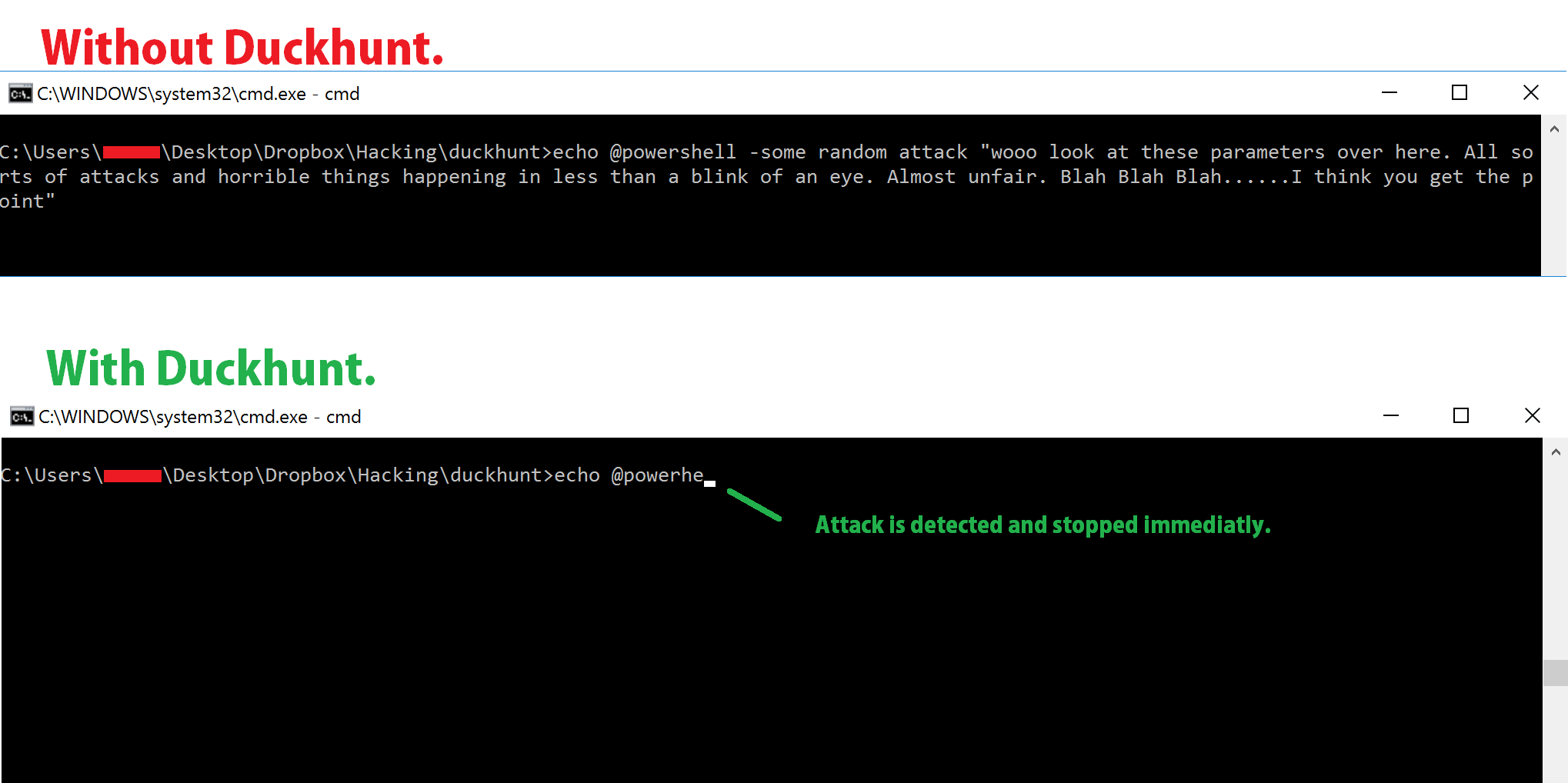
DuckHunt is a small, efficient script that acts as a daemon consistently monitoring your keyboard usage (right now, speed and selected window) that can catch and prevent a rubber ducky attack. (Technically, it helps prevent any type of automated keystroke injection attack, so things like Mousejack injections are also covered.)
Protection Policy
- Paranoid: When an attack is detected, keyboard input is disallowed until a password is entered. Attack will also be logged.
- Normal: When an attack is detected, keyboard input will temporarily be disallowed. (After it is deemed that the treat is over, keyboard input will be allowed again. Attack will also be logged.
- Sneaky: When an attack is detected, a few keys will be dropped (enough to break any attack, make it look as if the attacker messed up.) Attack will also be logged.
- LogOnly: When an attack is detected, simply log the attack and in no way stop it.
Extras
- Program Blacklist: If there are specific programs you never use (cmd, PowerShell). Consider interactions with them as highly suspicious and take action based on the protection policy.
- Support for AutoType software (eg. KeePass, LastPass, Breevy)
- Whitelist support for trusted windows/workflows that should bypass checks.
- Advanced burst detection (rapid interval streak and injected-event streak).
- Optional signature-pattern detection for suspicious command-launch sequences.
- Optional rolling command-fragment detection for suspicious payload text such as encoded PowerShell, LOLBin launchers, and download helpers.
- Optional risk scoring that combines timing, injected-event, low-variance, signature, command-fragment, blacklist, and sensitive-window evidence.
- Optional short-window risk-session accumulation for slower evasive payloads.
- Optional adaptive threshold mode (learned baseline + blended threshold).
- Optional low-variance burst detection for machine-like typing cadence.
- Optional timing-entropy detection for repeated machine-like cadence.
- Optional per-window threshold overrides for finer tuning by application.
- Optional sensitive-window tuning for shells, launchers, terminals, and registry tools.
- Temporary lockout timer in Normal mode to better absorb attack bursts.
- Optional lockout backoff in Normal mode for repeated intrusion bursts.
- Structured intrusion logs with reason + context for easier analysis.
- Optional JSON Lines incident export for downstream review.
- Live runtime status telemetry (optional JSON export) and pause/resume controls.
- Rotating log support to cap disk usage on long-running installs.
- Optional warmup calibration mode to reduce startup false positives.
Regular users:
- Choose and download one of the two options that best suits you:
- Now, copy the .exe above to the startup menu.
- In Windows XP,Vista,7 : This folder should be accessible from your Start Menu
- In Windows 10: Open a directory explorer an go to "%appdata%\Microsoft\Windows\Start Menu\Programs\Startup" (copy paste it in without the quotation marks).
Advanced Users
- Keep Reading...
- Feel Free to contact me, add issues, fork, and get involved with this project :). Together we can make a stronger tool!
- PyWin32
- pyWinhook for modern Python, or PyHook for legacy Python
- Py2Exe for optional executable builds
- webbrowser
- Step 1. Customize duckhunt.conf variables to your desire
- You can customize the password, speed threshold, privacy, etc.
- You can also tune advanced protection variables:
normal_lockout_ms,rapid_burst_interval_ms,rapid_burst_count,injected_burst_count,whitelist,pattern_signatures,command_fragment_*,risk_score_*,risk_session_*,sensitive_windows,adaptive_threshold_enabled,adaptive_*,low_variance_*,timing_entropy_*,window_threshold_overrides,status_filename,incident_json_*,log_max_bytes, andwarmup_*
- Step 2. Turn the duckhunt-configurable**.py** to a duckhunt-configurable**.pyw** so that the console doesn't show up when you run the program
- Step 3. (opt) Use Py2Exe to create an executable.
- Step 4. Run the program. You are now protected from RubberDuckies!
Recent BadUSB/HID-injection work argues against relying only on raw typing speed: practical defenses should blend keystroke dynamics with content/pattern context and behavior-based controls. DuckHunter keeps the existing timing detectors, but now adds a short in-memory command-fragment scanner, timing-entropy checks, configurable risk scoring, and short-window risk accumulation so slower or lightly randomized payloads can still be detected when multiple weak signals line up.
- More monitoring features:
- Add OSX & Linux support!
- Look for certain patterns (eg, "GUI D, GUI R, cmd, ENTER")
- Quality of life updates