⚠️ Legacy Project NoticeThis repository contains the legacy Proxidize Android application, an archived proof-of-concept app originally created for self-hosted mobile proxy deployments.
This project is no longer Proxidize's primary product offering. Today, Proxidize primarily provides managed cloud Mobile Proxies and Residential Proxies that do not require customers to deploy, root, or maintain Android devices.
For current Proxidize products, visit:
- Mobile Proxies: https://proxidize.com/proxy-server/mobile-proxies/
- Residential Proxies: https://proxidize.com/residential-proxies/
- Developer Docs: https://developers.proxidize.com/
This repository is kept online for historical reference and existing legacy users.
Proxidize Android Legacy was an experimental Android application created as an early proof of concept for self-hosted mobile proxy infrastructure.
This repository is archived and kept online for historical reference and existing legacy users. It is not recommended for new Proxidize customers.
For current proxy deployments, use Proxidize Mobile Proxies or Proxidize Residential Proxies instead.


Proxidize is a managed proxy provider offering Mobile Proxies and Residential Proxies for web scraping, AI data collection, SEO monitoring, market research, price monitoring, automation, and other data-driven workflows.
The legacy Android app in this repository was part of Proxidize's earlier self-hosted proxy infrastructure tooling. It is not the recommended starting point for new customers.

Proxidize currently focuses on managed cloud proxy services:
- Mobile Proxies — Managed 4G/5G mobile proxies using real mobile carrier networks.
- Residential Proxies — Managed residential proxy access with global coverage.
- Proxy Builder (Legacy) — Self-hosted platform maintained for existing customers.
The Android app in this repository is not part of Proxidize's current managed proxy platform.

This archived Android app previously supported:
- Creating HTTP(S) and SOCKS proxy endpoints from Android-based legacy deployments
- Manual and automatic IP rotation
- Rotation links/API for legacy workflows
- Optional custom tunneling server configuration
- Android 6.0 to Android 12 support
These capabilities are documented for historical reference only. New users should use Proxidize Mobile Proxies or Residential Proxies through the managed cloud platform.
Proxidize Android Legacy worked by establishing a connection to a tunneling server through reverse proxy infrastructure, then launching a local HTTP proxy server on the Android device. This architecture is documented here for historical reference only.

The application selected a random port between 10000 and 60000, connected to the client, and created a proxy server using the random port along with a randomly generated username and password.
- About This Repository
- What Is Proxidize?
- Current Proxidize Products
- Legacy App Capabilities
- How the Legacy App Worked
- Legacy Usage Notes
- Supported Android Versions & Devices
- Project Status
- FAQ

These instructions are preserved for historical reference and existing legacy users only. They are not recommended for new Proxidize customers.
Archived Android app usage instructions
- Download the legacy Proxidize Android APK file.
- Install the APK on a compatible Android device.
- Open the app and press Connect.
- Copy the generated proxy connection details.
Proxidize Android Legacy has built-in rotation. To set it up, you need to set the app as the default assistant in your settings.
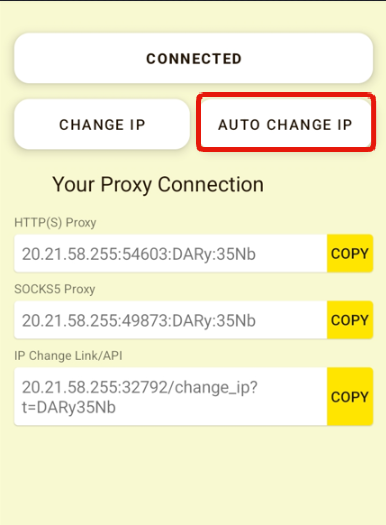
Proxidize Android Legacy allows you to set a rotation/IP change interval. To use it, you need to:
- Press "AUTO CHANGE IP" button on the home page.
- Select the rotation interval you wish to use.
- Select a time in minutes. Anything less than 30 minutes will harm your phone.
- Press "SET" and your settings will be applied.
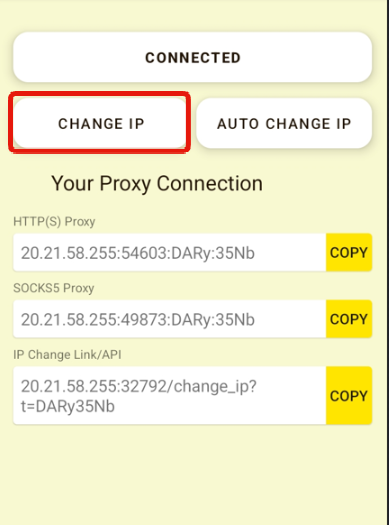
To change the IP address manually, you simply need to press the change IP button.
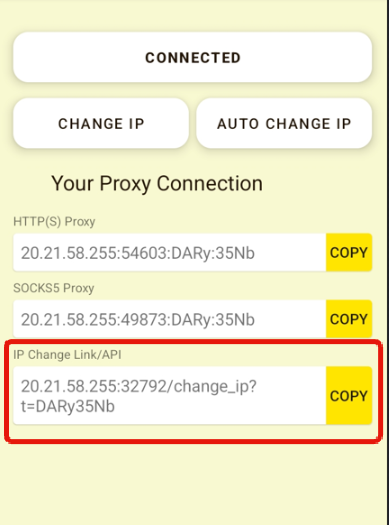
Proxidize Android Legacy generates an IP change link/URL/API that you can use anywhere to change the IP.
To change the IP using the rotation link, you need to:
- Copy the change IP URL under "IP Change Link/API" by pressing the "COPY" button.
- Use the link anywhere or send a GET request to it.
A success response is:
{"response":"success"}
Proxidize Android Legacy supports all armeabi-v7a running Android 6.0 to Android 12
Supported Android API from API 23 to API 31.
Tested devices:
All Android 6.0+ phones
Samsung A Series
Samsung S Series
Samsung M Series
Samsung Note Series
Google Pixel
OnePlus
This repository is archived and no longer actively maintained by Proxidize.
Issues and pull requests may not be reviewed. For current products and support, use:
- Mobile Proxies: https://proxidize.com/proxy-server/mobile-proxies/
- Residential Proxies: https://proxidize.com/residential-proxies/
- Help Center: https://help.proxidize.com/
No. This repository is archived and kept online for historical reference and existing legacy users.
No. New customers should use Proxidize Mobile Proxies or Proxidize Residential Proxies through the managed cloud platform.
Proxidize's current products are managed Mobile Proxies and Residential Proxies. These products do not require customers to deploy Android devices, tunneling servers, or self-hosted infrastructure.
Proxy Builder is a legacy self-hosted platform maintained for existing customers.